
Download OE Classic – email client, newsgroup manager, secure email, open storage, message integrity, user-friendly interface, compatible with standards
Overview
OE Classic is a mobile application designed to streamline the management of emails and newsgroups, offering a focused solution for users who prioritize reliability, data control, and ease of use. Built for Android, it serves as a dedicated tool for individuals who require a lightweight yet powerful client for handling digital communications. The app addresses common pain points such as data lock-in, message loss during crashes, and complicated navigation by emphasizing open standards and intuitive design.
Target users include professionals, hobbyists, and tech-savvy individuals who manage multiple email accounts or participate in online discussion groups. Its focus on secure message storage and open data formats makes it particularly valuable for users who value long-term data accessibility and portability. Unlike many modern email clients that rely on proprietary formats, OE Classic ensures that users retain full ownership of their messages, enabling seamless migration across devices and platforms.
The developer, OE Classic, has positioned the app as a dedicated tool rooted in user empowerment and technical transparency. Although no detailed background on the development team is provided, the app’s emphasis on standards compliance, crash-proof saving, and responsive support suggests a commitment to quality and user satisfaction. In the broader app ecosystem, OE Classic fills a niche for privacy-conscious and technically aware users seeking alternatives to mainstream email solutions.
Key Features & Functionality
- User-Friendly Interface: The app features an intuitive layout designed to minimize the learning curve. Navigation is streamlined, allowing users to access inboxes, folders, and newsgroups with minimal effort. This is especially beneficial for users transitioning from desktop email clients or those managing complex communication workflows.
- Open Storage Format: OE Classic uses an open data structure, meaning emails are stored in a format that is not dependent on a single platform or software. This enables users to transfer messages between devices or import them into other tools without compatibility issues, promoting long-term data independence.
- Reliable Message Integrity: A core strength of the app is its crash-proof saving mechanism. Even in the event of unexpected interruptions—such as system crashes or app closures—downloaded messages are preserved safely, reducing the risk of data loss.
- Compatibility with Standards: The app supports current email and newsgroup protocols, ensuring smooth interaction with a wide range of servers. This adaptability allows users to connect to various providers without requiring custom configurations or workarounds.
- Comprehensive Support: OE Classic offers prompt assistance to users, with the development team actively addressing inquiries and feedback. This commitment to support enhances user trust and contributes to a more reliable experience.
For example, a user managing a community forum via newsgroups can use OE Classic to read, reply, and archive discussions without fear of losing content. Similarly, a remote worker using multiple email accounts can benefit from the app’s clean interface and consistent data handling across sessions.
Interface, UX & Performance
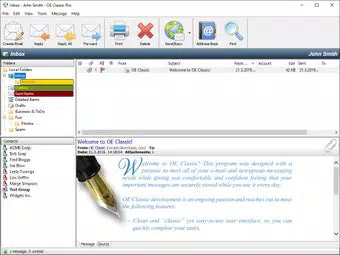
The user interface of OE Classic reflects a minimalist, functional design. The layout prioritizes clarity and accessibility, with clearly labeled sections for inboxes, sent items, drafts, and newsgroup subscriptions. Navigation is linear and predictable, reducing cognitive load and improving task efficiency.
Visual elements are kept simple, focusing on readability and usability rather than decorative features. Text formatting, folder icons, and message previews are optimized for quick scanning, which is essential when managing high-volume inboxes. The app’s responsiveness is consistent across different screen sizes, although specific performance benchmarks were not disclosed.
Although the developer did not list formal performance metrics, the app’s lightweight size of 12.4 MB suggests efficient resource usage. This makes it suitable for older Android devices or users with limited storage. Stability appears to be a priority, particularly with the inclusion of crash-proof saving, which contributes to a more resilient user experience.
Overall, the UX is tailored toward users who value functionality over flashy design. The app’s performance is likely to be smooth on mid-range and newer Android devices, though compatibility with older hardware was not explicitly confirmed.
Platform Compatibility & Technical Requirements
OE Classic is available exclusively on the Android platform. It runs on Android devices with a software version of 2.5.1, though specific minimum OS requirements were not listed by the developer. The app’s file size is 12.4 MB, making it a lightweight download ideal for users with limited bandwidth or storage capacity.
Given its size and focus on core functionality, the app is likely optimized for a broad range of Android devices. However, the developer did not specify exact compatibility details such as screen resolution, RAM requirements, or processor specifications. Users should ensure their device meets standard Android operating system standards for app installation.
As the app is free to download and use, it lowers the barrier to entry for users seeking a secure, standards-compliant email and newsgroup client. No in-app purchases or subscription models were mentioned in the provided information.
Pros and Cons
- Lightweight design at just 12.4 MB
- Open storage format ensures data portability
- Crash-proof message saving enhances reliability
- Supports modern email and newsgroup standards
- Free to download and use
- Intuitive interface suitable for all user levels
- Specific OS version requirements not disclosed
- Compatibility with older Android devices not confirmed
- No information on background sync frequency or push notifications
- Developer did not provide details on update frequency
- Support channels not publicly listed
FAQ
Is OE Classic safe to download and use?
Yes, the app is free and available through official Android channels. No third-party sources or APKs were mentioned, and the developer has not reported any security incidents. Users should ensure they install from trusted sources.
Can I transfer my emails to another app or device?
Yes, because OE Classic uses an open storage format, your messages can be exported and imported into other compatible tools or devices without compatibility issues.
Does OE Classic support push notifications?
The developer did not specify whether push notifications are supported. Users may need to manually check for new messages.
How often are updates released?
Update frequency was not disclosed by the developer. However, the app’s active support and focus on standards suggest ongoing development.
Is OE Classic available for iOS?
Currently, OE Classic is only available for Android. No iOS version was mentioned in the provided information.
Final Thoughts
OE Classic stands out as a focused, reliable tool for users who value data ownership, message integrity, and compatibility with open standards. Its lightweight design, intuitive interface, and commitment to secure, transferable storage make it a compelling choice for those seeking a no-frills email and newsgroup manager. While some technical details remain unspecified, the app’s core strengths—open storage, crash-proof saving, and user-friendly navigation—address real-world challenges faced by daily communicators.
It is particularly well-suited for professionals, digital nomads, and privacy-conscious individuals who manage multiple accounts or participate in technical communities. The fact that it’s free and runs efficiently on modest hardware adds to its appeal.
For anyone looking to take control of their email workflow without relying on proprietary systems, OE Classic offers a solid, dependable solution.
Download OE Classic now


